How Motorized Shades Actually Work in Danville Homes
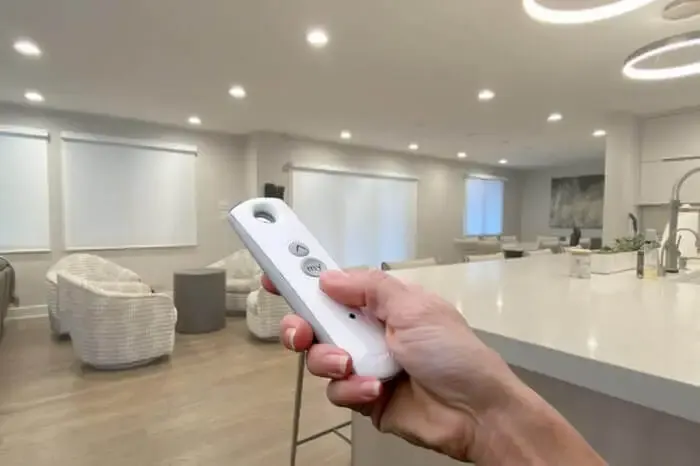
Motorized shades and smart shades get talked about like they're the same thing, and they are not quite. One is a shade with a motor in it. The other adds a layer on top that lets an app or a voice assistant reach that motor. Here is how the pieces actually fit together for a Danville home.
How Motorized Shades Actually Work
A motorized shade has a small motor built right into the roller tube, spinning the tube to raise or lower the fabric. That motor gets power one of two ways: a rechargeable battery pack that slides into the tube, or a direct hardwired connection to line voltage through a small power adapter. Both work fine, they just trade off differently on convenience versus install complexity.
The motor also needs a way to receive commands, and that's usually a radio signal, not Wi-Fi directly. A handheld remote talks to the motor over that radio link, and that alone makes a shade "motorized." Calling it "smart" usually means something more: a hub plugged into your router that translates between the motor's radio protocol and your home network, so the shade shows up in an app and can respond to a voice assistant.
Skip the hub and you still get remote control, just not app or voice control. That distinction trips people up more than anything else when they're shopping for Danville smart shades.
Power Planning and Backup Control
Retrofitting hardwired power into a finished wall costs more than planning for it during a remodel, since it means opening drywall and fishing wire through it, then patching everything afterward instead of running a line while the wall is already open. If a Danville project includes any renovation work, that's the moment to loop in shade wiring even if the shades come later.
A plug-in power adapter avoids that construction cost entirely and is often the more sensible choice for an existing home that isn't otherwise being remodeled, even though it means a small adapter box is visible near the window.
Keypads and extra remotes add a modest cost per unit, but they're worth it as backup control, since losing app access during a router problem is genuinely inconvenient if a physical remote isn't sitting somewhere in the house.
Every home's Wi-Fi layout and window setup is a little different, which is exactly why a generic online configurator only gets you so far. A free in-home measure gives someone a chance to look at your actual router placement and wall layout before recommending a system.
Battery Life and Charging in the Real World
Bedrooms and living rooms with average use, opened in the morning and closed at night, are the easiest case for battery motors, since one or two cycles a day sips very little power. A home office shade adjusted constantly to manage glare on a screen is a different story and will need charging more often.
Large windows in a Danville great room or a sunroom, where a single shade might be five or six feet wide, draw noticeably more power per cycle than a narrow bedroom window, simply because the motor is moving more fabric and more weight.
For a room where the shade barely moves, maybe a formal dining room that only closes for parties, a battery can go a long stretch without attention, which makes battery power a perfectly reasonable choice there.
What Actually Fails in a Smart Shade System
Ask what happens to the system during a power outage, specifically whether the hub reconnects automatically once power is restored or needs to be manually re-paired. Some manufacturers have handled this better than others, and it's a fair question to ask before buying into a particular ecosystem.
Ask how the hub performs at a distance from the router, and whether a range extender or a second hub is available if a Danville home is larger or has a layout with a lot of walls between rooms and multiple floors.
And ask what a typical service call looks like when something goes wrong. A company that mostly deals with dead batteries and Wi-Fi hiccups is telling you something different than one that's constantly swapping out failed motors, and that difference says a lot about how the system was set up in the first place.
Voice Control and the Hub Question
The most common surprise: someone assumes a shade that works with a smartphone app will automatically work with their voice assistant, and those are not the same thing. An app can talk directly to the manufacturer's own cloud service. Getting a voice assistant into that conversation needs a specific integration the manufacturer has to have built and published, and not every brand has built one for every platform.
Another issue: a hub sitting too far from the router, or on the wrong floor of a Danville home, can drop in and out even though it appeared to set up fine on install day. Wireless range for these hubs is real but limited, and thick walls make it worse.
We've also seen homeowners buy a Z-Wave-based shade assuming it would work with a Zigbee hub they already owned for other devices. The two protocols don't talk to each other without an additional bridge built to translate between them.
Frequently Asked Questions
Should I choose battery or hardwired shades?
It depends on how often the shade will be used and how easy it is to run power to that window. A shade that gets adjusted constantly, or one that is hard to reach for charging, is often a better fit for hardwired. A shade used once or twice a day in an easy-to-reach spot works fine on battery.
Does a solar panel really extend battery life?
It can, but only if it gets real direct sun for a meaningful part of the day. A solar add-on mounted on a shaded or north-facing window will not help much, since it needs consistent light to actually offset what the motor is using.
What should I ask before choosing a smart home hub?
Ask exactly which voice platforms it supports by name, not just whether it is labeled smart home compatible, and ask how it performs at a distance from your router, since range varies by hub. A firmware update's track record with existing schedules and scenes is also worth asking about, since that says a lot about how stable the system actually is.
 How to Choose Drapery Fabric and Color in Danville
 Outfitting a Danville Apartment Building With Window Coverings
 Where Roller Shades Belong in a Danville House, Room by Room